
A guide to getting turn-by-turn navigation working on the Edge 800
Intro
The Edge 800 is fantastic for is navigation – I frequently cycle up to and over 100 miles, often in places I’ve never been before, without getting lost. Even better is that I pre-plan my route to visit particular places, follow the nicest roads/avoid the nasty roads and pass the features I want (cake stops!) when I want.
What’s not fantastic is the documentation on the best way to get this working. I’ve therefore put together this guide broken down into just 6 steps:
- Set up your Edge 800 – some of the default settings are a bit odd so we’ll change them (only needs doing once)
- Plan your route
- Download your route
- Copy your route onto the Edge 800
- Configure your route – again, some of the default settings are a bit odd so we’ll change them
- Go ride!
After the guide there’s some sections covering other relevant information.
Maps
As maps are so important to the success of turn-by-turn navigation, and the main reason people have problems, I’ve moved this section to the start.
In short, the built-in map on the Edge 800 only know about major roads and there is not the detail needed to give turn-by-turn navigation. If you’re reading this page you almost certainly need to add a better map via a Micro SD Card.
There are three options for these maps:
- Garmin City Navigator – good quality road maps, ideal for road riding only
- Garmin GB Discoverer 1:50K – OS maps for the UK, ideal for cross country mountain biking
- Open Street Map (OSM) – consumer made maps including cycle paths, ideal for road riding and use of cycle paths
The Garmin maps cost and you can’t get updates without buying another. However, they are very convenient as they come ready to go on a Micro SD Card.
I now prefer the OSM maps and, even better, they are free (except for the cost of the Micro SD Card). John Tiffany has written an excellent step-by-step guide to getting them in the comments below.
Initial setup
Some of the default settings on the Edge 800 are a bit odd/undesirable/wrong so you need to make a few changes (this only ever needs doing once).
Select Menu, Spanner (Wrench), System, Map and then set the options like so:
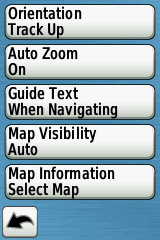 Once done, press the back arrow, select Routing and then set the options like so:
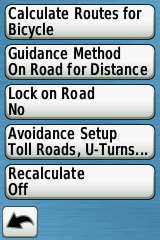
When you get to Avoidance Setup, set the options like so:
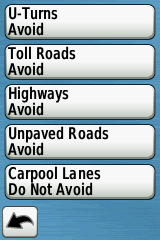
Keep pressing (or press and hold) the back arrow to get out of the menu system.
Plan your route
There are numerous websites out there that allow you to pre-plan a cycle route but RideWithGPS is by far the best so that’s what I’ll assume you’ll be using.
Some tips for route planning (originally written by Uncycle on the Garmin forums):
- To avoid the confusing the Edge 800, always finish a circular route 10-15 metres away from the start
- When plotting a route always click in road segments NOT at junctions (to avoid little side stubs when you click a bit inaccurately)
- Allow the website’s routing algorithm time after each click to complete its routing to that point (avoids odd little loopbacks)
- Go round the course at max zoom to check that all is correct
Another little trick that I do is to grab “peg man” and hover him over the route, if my route lights up blue, it means the Google StreetView car went down that part of the road and so there shouldn’t be a problem going down it myself. If it doesn’t light blue then why did the StreetView car not go down there? Most likely it’s an unpaved or private road that Google thinks is navigable when in fact it’s not practical and/or legal to do so.
Download your route
Once you’ve planned your route on RideWithGPS, use the Export feature to save the route as a GPX Track.
If you ignored the very first section about maps (and only have the built in ones) or you’ve added your own entries to the Cue Sheet on RideWithGPS and want to be notified of these, then you will need to export the route as a TCX.
Copy your route onto the Edge 800
Plug the Edge 800 into your computer, wait for it to be recognised and then copy the GPX file you exported into the GarminNewFiles folder on the Edge 800. I prefer to use the GarminNewFiles folder on the SD Card as it means that should the Edge 800 ever do a “factory reset” during a ride (I’ve heard this being reported, but it’s never happened to me) then at least my route is still safe.
Configure your route
Once you’ve got a route on the Edge 800, it’s worth changing a few of the default settings.
Unplug the Edge 800 from your computer and once it has booted up, select Menu, Courses, your course, Spanner (Wrench) and then set the options like so:
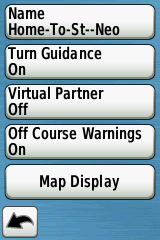 When you get to Map Display, set the options like so:
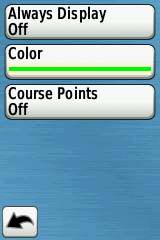
Of course you can pick any colour you like, but I find lime green works well. Note that this colour only applies when Always Display is On; If you’re “doing” a course then this will be shown in purple and you can’t change that. See Go Ride! section for clarification.
Keep pressing (or press and hold) the back arrow to get out of the menu system.
Go ride!
Once you’ve done the above actually navigating a route is really simple, just select Menu, Courses, your course & hit the big green Go button. This will cause the Edge 800 to:
- Overlay the route on the map page (in purple, you can’t change that)
- Give you turn-by-turn instructions (bleep & on screen prompt)
- Give a bleep and an instruction for every entry in the RideWithGPS cue sheet (if you used the TCX option)
- Shriek and show “Off Course” if you stray off the route
An alternative (if you don’t want the bleeps & prompts) is to not hit Go but select the Spanner (Wrench), Map Display and set Always Display to On. Then keep pressing (or press and hold) the back arrow until you’re out of the menu system. If you then find the map screen you’ll see your course displayed (in the colour you chose, e.g. lime green above) and you just need to follow the line. This option obviously removes any intelligence from the device, which is no bad thing if you don’t want to follow a course exactly or you’re not totally familiar with the technology and want to keep it simple and/or quiet.
Note that when you hit the Go button, the Garmin will say “Calculating” from 0 to 100% whilst it works out the turn-by-turn notifications for your route. The speed at which it goes through this process is not consistent (e.g. it may take as longer to get from 30% to 40% than it did to get from 20% to 30%). On longer routes it may stick on 100% for a while.
Ride WithGPS Premium Users
It’s worth noting that RideWithGPS Premium users have two extra features directly relevant to the Edge 800:
- Garmin Write – this sends a route directly to your Garmin Edge 800 as a GPX Track meaning the Putting a route onto the Edge 800 section is completely redundant and the whole process is easier/quicker.
- If you use the TCX format you can tick the “Notify before turn?” option to get an extra bleep just prior to junctions.
There are lots of other benefits to being a premium user as well as the fact you’re supporting a great website run by two great guys so it’s worth considering.
Issues
There are some issues/bugs relating to the above that I’m aware of:
- If the maps you have loaded don’t contain all the paths used on your route, the Garmin might change your route during the “Calculating” phase. I’ve heard of another user experience this and I’m 95% certain I saw this once or maybe twice when I used a lot of cycle paths on my way from Calais to Amsterdam. I did my route plan on RWGPS using OSM (which knew of the cycle paths) but had a Garmin map loaded on the Edge (which didn’t have all the cycle paths). I suspect different settings (e.g. “off road” in guidance) might of have meant this didn’t happen but I haven’t experimented as I now use the OSM maps on my Garmin so it’s unlikely to reoccur.
- Sometimes you don’t get a turn prompt when you expect one. This is because the map you have loaded doesn’t know about or understand the junction and isn’t a fault with the Garmin. Typically this happens when the map thinks a junction has a different layout (different road priorities) to what is marked on the road.
- I’ve heard people say that turn-by-turn notifications sometimes stop working during a route. I think I’ve seen this myself too, though I’m not very observant of it as I’m not very reliant on them. I’m happy just following the line on the screen, following the obvious road and relying on the “off course” shriek to alert me if I made a mistake. If this happens to you, then stop the course and restart it, it’ll carry on from where you are.
Any Questions?
If you’ve any questions or comments re navigation using the Garmin Edge 800 then leave a comment below. Please don’t ask generic questions about the Edge 800 or questions not related to the above as unfortunately I’ve not got time to answer those, use the Garmin Forums instead.
You may also want to visit the excellent tutorial at ScarletFire.
Hi Rafe
I have a few questions about the Edge 800 I hope you don’t mind answering?
Why Guide Text only when navigating?
Is Lock on Road where any routing or recalculating will only route on roads?
Why recalculate off?
With Map display I’m still not clear with what it does. I’ve been using this with on. What exactly does turning it off do?
Why course points off?
If i’ve loaded a course and i go off course i know it tells me i’m off but can it re-route you back to the course – not necessarily going backwards, i.e. will it guide me to the nearest point?
If I am out somewhere and i decide i want to join a course tha i have saved will it route me to the nearest point rather than the start?
Sorry for so many questions but i love this gadget but don’t fully understand it yet and am looking for some help.
Regards
Chris
Hi Chris,
No problem with questions though I’m not sure I can answer them all!
Guide Text – that’s the default I think and I’ve never questioned it!
Lock On Road – I think that assumes you’re on a road always, so moves the current position to be on the road even if the GPS has you slightly off it. Again, a default I’ve never questioned.
Recalculate Off – I like to plan a route and stick to it. If I need to divert I tend to zoom out and then use the map + original route to work out the alternative rather than the Garmin help me. Recalculating on the 700 was quite broken so this may now be a redundant habit.
Map Display – If “on” the route is always shown on the map, even if you’re doing a totally different route/course (or indeed not doing any course at all). I use this feature sometimes if I don’t want to “do” a course but still want to follow it.
Going Off Course – it should work like that but see my comment re Recalculating above 😉
Joining a course part way round – it does indeed work like that.
Hope that answers your questions, any more ask away and I’ll try and answer.
I think the best thing you can do with the Edge is plot a simple course near your house then play with the settings. That’s all I did and whether I got it right or wrong could be open to debate. However, I’ve settled on the method outlined on this page and it works brilliantly for me.
I have garmin 800 with Discoverer 1:50K maps enabled and basemap disabled. I have followed instructions above. When I try out a course from ridewithgps tcx file or gps file I get the white arrow for directions but no alerts. Also the maps look blurred on zoom and no better than in basemap. The line colur is still purple even though I have set it to lime green.
I’d really appreciate it if you can help weith this.
Peter
Hi,
On RideWithGPS, export as a TCX and make sure you tick the box that says “Notify before turn?”, that should bring up a small square with a turn arrow in it, just prior to each turn (as per cue card). If the map is routable (not sure if the Discoverer map is) & you select “Turn Guidance On” as above then just prior to a junction (or what the Garmin perceives as a junction) you’ll get a new screen showing a close-up of the junction with a huge white arrow showing you the way to go.
No idea about the blurry map, I do have the Discoverer map and it’s always been fine zoomed in to 500ft (what I normally use off-road). If you’re riding on-road then it’s perhaps not the best map choice & you might find the Garmin European road map or OpenStreetMaps better. I have the former, but haven’t heard anything bad about the latter & they’re free (though I’d put them on a new SD card, not the current one).
The line colour when doing a course (i.e. you selected the course & hit “Go” as per above) is always purple, you can’t change it. The lime green you have chosen is only applicable if you’ve selected “Always Display On” and aren’t actively following the course (in which case you won’t get directions).
Hope that helps.
Hi
thanks for the info on putting a route on the edge, i have done this successfully from the tcx file but the mileage is showing much more than what the route actually is, course showing 88ml but the route is only approx 47ml any ideas
thanks
Heather
It’s not a problem I’ve seen before. On what screen is it saying 88 miles? If the route isn’t local to where you are (or where you last had a GPS signal), are you sure you’re not confusing the bit that shows you how far that route is from you?
thanks, route is ok miles showing how far from my address as route isn’t local to me.
Heather
A guide to getting OSM maps onto the 800.
The Open Street Maps (OSM) are much better than the City Navigator ones. They include all the national cycleways and quite a lot of other paths, not all surfaced. If you want to use the unsurfaced ones just set avoidance to No (see screenshots in main article).
If you want more maps the process is the same except you will need to rename the gmappsupp.IMG file to something unique before copying it into the Garmin folder.
I hope this is useful.
Another alternative is here: https://sites.google.com/site/openstreetmapgarmincycleuk/
John, thank you for your step by step procedure. I have tried on a few occasions to add a second map to my garmin with no success. Currently i have an actively working NY state map and was looking to add a California map for an upcoming trip. i have named the second map something different then the first however the Garmin does not seem to want to take the second map. Any suggestions?
If the maps both came from the website mentioned above then they will appear in the Garmin Maps screen as one thing, but it will have both areas loaded.
I do all that on my edge 1000 then the map seems to disappear in the ether-can’t find it anywhere on the edge 1000-HELP!!!!!
First of, great help on here. I’ve just go my 800 and I will only be using it off road, is it better on the lock on road option to set to off road. ,
My main aim is to download routes and use them to learn new trails, not too fussed about navigation as I’m happy to treat it like a map.
Thanks in advance.
Hi Carl,
Off-road I just find the route and set “Always Display” to On, then follow the line. Pick a nice bright colour – the lime green or bright red work quite well on an OS Map. I don’t bother doing the course.
Rafe
That sounds like just the guidance I’m after. I’m doing a route through Belgium which will combine roads and major cycle paths but I am not confident that turn guidance will get me from start to end in a foreign land. When you say ‘don’t bother doing the course’ is that just don’t press ‘Go’?
I’m about to go to Belgium on cycle paths and roads, I’m confident that using OSM (as described in the comments above) then it’ll give me turn-by-turn. And yes by ‘don’t bother doing the course’ I mean don’t press ‘Go’.
don’t you need to press “go” in order to get turn by turn?
Yes you do Jeff. However, I think Nick was talking about the alternative method of just following a breadcrumb:
"An alternative (if you don’t want the bleeps & prompts) is to not hit Go but select the Spanner (Wrench), Map Display and set Always Display to On. Then keep pressing the back arrows till you’re out of the menu system."Yes I was, thanks for clarifying. I’m a good deal happier now knowing I have the OS map option (and encouraged by your confidence!) if I can get a reliable OS map for Belgium, but also have a plan B for the garmin if turn by turn doesn’t do it for me (just follow a clear line on the map). Cheers.
Great article, thanks for taking the time to create it.
A few people in the comments are talking about free Open Source Maps.
Here’s a video tutorial showing you where to get a good one, and how to install it to the Edge 800: http://www.scarletfire.co.uk/2012/01/tutorial-how-to-install-free-osm-maps-to-your-garmin-edge-800/
Thanks for that. I followed John’s instructions above and found it very easy to do.
Indeed it is 🙂
I’ve toyed with rolling my own OSM maps using the java tool MKGmap. It could be useful in terms of specifying different styles to get a different visual feel to the OSM maps, but there is quite a learning curve involved. It’s all time isn’t it? I’d rather be out on my bike 😉
You’re a star, thanks for taking the trouble to put this up and lots of useful comments- page favourited. The manual is diabolical and I’d had lots of trouble finding how to get the unit to put turn signals up over the display screen I was looking at.
I have the City maps, and use the Garmin Connect planner, which in my view is pretty good, and uploads straight into the unit.
Needless to say, I sync the Edge with Strava when I get home to see how bad I still am compared to everyone else!
Nice cars by the way- S3 XJ is one of my favourites, and in that colour combo!
No problem. Any questions ask away.
The cars all belong to my father, who is having a lot of fun playing around with different cars with my inheritance. Good luck to him I say!
Thanks for the help!!
I use Garmin Connect to pre-plan routes and download to my 800. I am having difficulty getting any turn by turn instructions when doing a Course. I do get them when just simply navigating from point to point.
I have it setup as above, and I have got the 1:50 000 GB Explorer map.
Any tips??
Many thanks
Hi Alex,
Nothing springs to mind except it might be a difference in the maps you use to plan a route or with the way you’re exporting from Garmin Connect.
You could try RideWithGPS.com, it’s far better for planning routes anyway.
Are you road riding or off-road riding? If road riding then I’m also sorry to say that the GB Explorer map isn’t the best. However, for the price of a new SD Card (a few £) you can get a really good set of maps by following the instructions John’s comment above. I’ve not experimented with them much yet but am already thinking they might be better than anything Garmin offers.
Fab website, your instructions worked a treat for me with my GB Discoverer Map.
As an FYI to everyone, I needed European mapping recently and did look at the Open source maps but in the end managed to pick up a Garmin Europe map for £39 including post and packing. It hasn’t got a fancy 3D look that the Edge 800 packaged version does but it does the trick all the same and these instructions work on it just as well.
Does you Garmin Europe map cater for cycle paths or just roads?
Garmin has a few cycle paths but Open Street Maps tends to have most of them on it. For Europe I now use OSM maps exclusively. Don’t confuse OSM meaning Open Street Maps with OSM meaning Ordnance Survey Maps! You want Open Street Maps for Europe – they are free and if you search the comments you can see how to get them.
Followed the excellent guidance here and managed to get the Open Street map for Belgium loaded onto my Garmin SD card. When we land over there this June ready to cycle my understanding is I’ll need to enable it and the INTL Standard Basemap? At the moment I have ‘CN Europe NT’ and INTL Standard Basemap enabled. Should I just disable ‘CN Europe NT’ so there’s no conflict with the Belgium OS map?
Hope that makes sense, map settings are a new one on me but the right activation is crucial if the garmin is to be any use at all picking up cycle paths. Cheers.
Disable all maps except the Belgium one. You don’t need the basemap if you’ve a better one enabled. It should then pick up any cycle paths that it knows about.
Great tutorial thank you. It looks like this is mostly for road rides. Would setings be different for mountain bike rides? I am having trouble following downloaded courses and I know it is me that is the problem. Can you tell me the correct way to start a course because frequently have no history of the ride after I finish.
I park about a quater mile from the start get ready and trun on the 800:
Select Menu>Course>Select my course> hit go.
Garmin asks me if I want to navigate to course. I select yes then proceed to the beginning of the course and start the timer. This where it gets hit and miss as to weather or not I am actually following the course and recording data. On todays ride for example I followed course and stopped half way for a break and auto pause came on. WHen I ended the ride my download showed that only the first half of the ride was recorded, everything after my stop was not recorded. Any help you can give me would be greatly appreciated.
These settings should work for mountain bike rides, though the trails you’re on might not be routeable so the Edge 800 might struggle. If I’m on the MTB, I don’t “do” a course, I just go into the course and set “Always Display” On then, follow the green (if that’s what colour you’ve chosen) line. Hit start when I start off.
If I am not quite at the start then I never say yes to “Navigate to course”, I always cycle to the start then go from there. Not sure why!
Sorry, I have never had a problem with only part of a ride being recorded, maybe ask on the Garmin forums?
Thank you for taking time to answer the question for me. I rode today and everything worked as advertised.
Re “only records part of the course” mine does this if I forget to press Start after I stop for a break.
I’ve had this happen to me a few times. Now when I resume my ride I always scroll across and make sure the timer starts again. I know this is the problem because I noticed the timer had stopped on a ride when I scrolled across to check the time of day so I pressed the button to start the timer again. When I got home and uploaded the ride the route had drawn a straight line from where I’d taken a break to where I’d restarted the timer.
I’m new to the Edge 800… but had been using an Edge 705 for three years !
I have one problem : when I am using a route made with MapMyRide (GPX) or RideWithGPS (TCX) everything is working as you described with your setups except that I have no bleeps or sounds. The arrows are there, the directions are shown on the top, but no sound before or getting to a new direction.
Is this normal ? Any suggestions ?
I followed the Edge 800 directions to get to my route and the Edge 800 beeps and prompted till I start my route. After that, no sounds !
Thank you !
Hi,
Sorry, that’s a new one on me! I’d of said it was a volume issue but you are getting other beeps, or you’d not selected Turn Guidance on but you’re getting the arrows. Have you tried the Garmin forums? Let us know if you have an answer.
The answer is quite simple !
And I am telling this with my head in the sand…
I use my Edge in French and I was confused with « Course Points » translation ! I tought it meant the equivalent of « Distance markers » so I keep it « Off » like you suggest !
But, if I set it « On », bingo, the bleeps are there !?!
Thank you for your « Step-by-Step » page !
just bought a garmin edge 800 iv no sd card in it would that be the reason small roads in my area arnt coming up and just A and B roads?if I bought a uk and ireland sd map for my garmin 800 will that bring up the roads?
Hi Bryan,
Without an SD card, you’ll only see major roads.
I now prefer the OpenStreetMaps to the Garmin ones, and they’re free! Not as easy as buying a pre-populated SD card from Garmin, but if you’re happy with ZIP files etc. then it’s not hard if you follow John Tiffany’s instructions above and massively cheaper.
If John’s instructions don’t make sense then buy the Garmin road map (not the OS map).
Either will solve your problem.
Hi there,
Just bought myself an Edge 800 (cheaply as the 810 is now on the streets!) and a micro SD card with Garmin’s GB Discoverer maps.
Once I install the micro SD card is there any danger that data from the device will overwrite the map data on the micro SD card?
Additionally, can I back-up the Garmin map data on my laptop and add it to another SD card if required?
Many thanks for your help.
Clokey.
No danger of it overwriting anything. No you can’t back-up the data as it’s tied to the SD Card.
Hi,
I have an edge 800 and would like to know if I have to press ‘start’ after I have turned my garmin off. For example, am on long ride and stop for lunch, turn garmin off to save power, back on when I start cycling again but do I need to press start again? (Am following a route)
Cheers,
Tim
Yes you will have to press start again, but it’ll carry on from where you left off.
Hi, when I turn mine off, at lunch for example in a long ride, I seem to lose my data and have to reload the route. Any ideas as to why?
What evens more confusing is that it never used to do that. It seems to be a new (unwanted) development.
Thanks man
I don’t have this issue with my Edge 800, I’d take it up with Garmin.
Hi Matthew, don’t know if this will help but I just cycled round the Netherlands and never pressed the reset button at all when I turned the device off at night, when I turned it back on in the morning it restarted where I left off. I did notice that it asked me to press ‘reset to save’ but luckily I didnt, so it just kept on tracking.
Hello,
I’ve tried saving a route as a GPX track but when I download it onto my garmin Edge 800 it doesn’t show up upon removing the device from the computer (I remove it properly by ejecting the device from the dropdown menu). My device will only show TCX files. Any suggestions?
Cheers,
Phil.
I’ve not heard of this issue and my Garmin edge works fine with a GPX track from RWGPS. Are you sure you’re putting it in the correct folder (NewFiles)? Does it move from NewFiles after you’ve removed it from computer, started it (that’s when it does the conversion), and reconnected it to computer?
Hi
Nice guide, thanks. For off road, your advice to follow the ‘always on’ map is fine but presents a problem when the route crosses another point on the route in a loop as you can’t see which way to go with both options being the same colour! Any advice on how to overcome this? Has anyone got turn by turn working well off road?
Hi, I’ve just “remembered” which way to go when it’s crossed over, and I often take a printed map with me too which makes it easier. What about split your route into two parts, out & back? Then you can enable them at different times and/or use different colours? Or just experiment with routing off-road. What map are you using?
I use osm maps from Talkytoaster and also have Velomaps, the MTB equivalent and the OS Garmin maps but I really don’t like that map. Talkytoaster the best for me by far. I could break up the map into sections I guess, hadn’t thought of that! I’ve spent a lot of time getting mine to navigate accurately whilst off road and haven’t managed a reliable way yet so may just settle for your method, I haven’t had a chance to try that out off road yet. Thanks for the speedy reply!
Hello,
I have just gotten a garmin 800 and gone for a few rides and I am getting different results. I am able to navigate round ok but I am just following the route. It doesn’t give me and warnings prior to the turns or pop up messages. It does beep but only at the point of the turning or just after.
I have uploaded a tcx file
I have been in the settings on the course and have them as follows
Turn Guidance On
Virtual Partner Off
Off course warnings On
Map Display – Always Display Off
Map Display – Course Points On
I think it might be to do with Course points but I don’t know what they do. I have tried various different settings and still can’t get it to do it.
I have tried a route today from the garmin connect website rather than RWGPS so I will see in a bit if this makes any difference.
Just wondering if you knew what could be causing it based on the above settings.
thanks
Dan
Hi,
It sounds like you don’t have a routable map loaded, see the map section above.
Once you do have a routable map on SD card, and enabled it, use a GPX route instead of a TCX.
Hi, have followed the instructions here ( thanks by the way ! ) but the garmin seems to be random whether it gives guidance or not.
I export my maps from ride with gps and the appropriate options set. But I can’t seem to determine a pattern why sometimes it gives guidance or not.
I copied a route with ride with gps that gave correct guidance, modified the route and exported.
Nothing came up. Even though the route I copied from was fine. Any ideas ?
Using talky toaster maps, so should be routable.
When I choose a route it does say calculating and goes from 0% to 100%. Should this be happening ??
Thanks
Sorry, but I have no idea, perhaps try the Garmin forums. If you do find out though, let me know so I can update it here.
Yes it does do the “Calculating” thing whilst it works out the turn-by-turn notifications in advance.
See the new “Issues” section I’ve added for more info.
I think i have this…not sure it’s been answered, but i have found that i needed to turn guidance off and then back on again in order to kick start the turn by turn directions
Thank you so much for all this info folk.
I have one question – If I am just going on a normal track my ride but get lost, can I key in ‘Home’ on my 800 and get it to direct me there?
Hi, Yes I believe you can but the route might not be ideal as the Garmin has funny ideas sometimes!
I’m doing the Devon C2C over 3 days. Do you know if I can break the route into 3 courses, one for each day, but just create one activity for the whole 3-day trip? (i.e. keep the timer running over the 3 day trip, obviously pausing over night!) Or should I set the whole route as one course?
Very helpful site – thanks taking the time to share all that you’ve learnt.
Based on my experience I would break the route into 3 courses and start/stop the activity each day, otherwise there’s a risk it’ll get corrupted or lost. If you really want to join them up afterwards, then there are utilities to do this for you.
Thanks for your advice. Please can you point me in the direction of the utilities you mention?
I’ve never tried them, but a quick google for “join fit files” found one http://fitfilerepairtool.info/ and am sure there are others that join FIT or GPX files.
Thanks. If I get round to joining the files together I’ll let you know how I get on.
Cycling London to Paris and the poxy purple line has driven me crazy – its impossible to see on the OS maps and not brilliant on the city navigator. I tried everything, but in the end, by FAR the best way I have found is to put it in NIGHT MODE… I know – but that way you get a nice pink route line on a black background (on City Navigator), and you can actually tell where the route goes. A few other things suck in night mode during the day, but they are all far less important than the most basic function of navigating a route. Shame on Garmin for not providing a solution, given that so many people hate the poxy purple line. Try it, post your view of it the purple line (and Night mode if you find it better), and lets see if Garmin will finally do something…
Hi Jez,
I had exactly the same issue while trying to follow a course I uploaded to my Garmin Edge 800: I was unable to follow the thin purple and not only lost my way but also my face since I was riding with a friend of mine and we lost lot of time looking for our way.
Eventually, I found a solution:
in System/Map/Orientation, select “Automotive Mode” instead of “North up” or “Track up”.
then the thin purple line is replaced by a thick white line with a black contour.
it was better but still not ideal since the OSM I was using (loaded from http://garmin.openstreetmap.nl/) is showing small roads in similar format (while lin/ black contour) and it’s a bit confusing.
So after some Google search, I found a different distribution of OSM maps on velomap.org. Since I’m roadie (a triathlete, to be more accurate) I used the “race” option while creating the map: I assume, this gives better contrast.
The resulting map displays the roads in different colors than the thick white line and now it works just great !
Jeff
Thanks for your post, been really helpful setting up my new 800.
Quick tip: instead of keep pressing back to get out of the menu system, just hold your finger on back and it jumps all the way out 🙂
For almost 2 weeks now i’m trying to use the navigation in my edge800, however it always directs me directly to the endpoint of the route. I’m riding loops. This did not happen before so i’m quite puzzled of what’s going on. I’m using BaseCamp to create the routes and i’ve placed the end point at least 500 meters away from the starting point (was a tip from the garmin forum), however this does not help… Would you happen to know a good solution? It feels like i’m missing something and it’s kinda frustrating…especially when i’m all geared up and ready to go.. Thanks in advance for your answer!
I’ve heard of this but never it’s never happened to me. If I plan a route from home, I always go out my road one end, and come back via the other end but that’s only 20m gap between the start and end points. I suggest you go through the above and check you’ve got all the settings right. Try use RWGPS instead of BasceCamp as a test. Failing that, try the Garmin forums.
Hi Roger,
I’m having the same problem. Did you already find a solution by any chance?
Paul, I sometimes have this problem too when cycling a trip starting and ending at my home. So cycling the right direction and stop the course as you notice it wants to go directly to the finish. and choose it again. Then it finds the right way.
Further info: I use an 16 GB micro SD-card, and many maps (based on Openstreetmap) on it for cycling (normally Netherlands), skiing. I really enjoy the maps from openfietsmap.nl
Hi Rafe, I have put the OSM maps on my Garmin (which definitely looks better), but the one concern I have is that if I want to use the OS map for trails/XC I have to swop back to the memory card that came with the Garmin. Is there a way to have Base maps, OS and the OSM on the device. Could I copy it all to a bigger memory card or is the Garmin OS maps write protected?
If your Garmin maps came on SD card then they are tied to that SD card. If they came on CD or electronically, then you can move them from card to card.
No reason why you can’t put the OSM maps onto your OS map SD card if there’s room. Just rename them to something different (but keeping the extension the same).
Thanks for this, its a very helpful start up guide. Someone mentioned recalculating earlier, personally I dislike the Garmin recalculating, often I spend a lot time designing a route to take me past areas that i want to visit. With recalculate “On” theres a a chance that the Garmin will re-route an entire section of your ride just because you missed a turn by 10 yards…I prefer to rely on the “off course” warning.
thanks again
Same here John. Recalculate should always be “off”. If I find I can’t follow my exact route (e.g. roadworks) then I just zoom the map out a bit and navigate myself round the obstacle.
I have been having trouble with this. If I go off my route and then reconnect with it (and get the “course found” message) I lose my turn-by-turn instructions. For the rest of the ride it just wants me to go back to where the wrong turn happened. Is there any way to fix this?
Please go back and check all your settings are as per above, especially the recalculate ones. It shouldn’t work as you describe.
Hi – great site for us newbies !
I have the City Navigator SD card in my 800, but am doing an Irish Sea / North Sea C2C in a few weeks that goes on tracks / trails, so the mapping doesn’t fit the bill. If I want to use the Open Source maps, do I just need to buy an SD card and follow the instructions on here to download the maps and just swap the SD cards so the route can follow a map with the trails on ? I think the City map works fine on the road, but am not sure of the impact of swapping cards around if any – I save my rides to the SD cards and upload to Garmin Connect, so I shouldn’t ever lose history that way.
On a related note has anyone got any ideas why when I switch on my GSC10 – Cadence seems fine and the routes in terms of maps records correctly, but the distances and speed are roughly 30% of the correct distance and speed. I did the ride with Brad 100km the other week but the distance recorded was only 34km. If the GSC10 isn’t used the Garmin speeds and distances recorded are accurate. I assume the GSC10 is faulty but wondered if anyone else had similar ? I’ve asked Garmin to replace it as it’s only a few months old
Yes, you can just buy another SD card, put Open Street Maps onto that and swap. If you save to SD card then of course you’ll have rides on a mix of cards. If you give the map a different name (and there’s room), you can put it on your existing card and then enable the relevant map via the menu system.
As for the other issue, the battery in your GSC10 is flat or it’s auto calculated your wheel circumference wrong or it’s faulty. My money is on one of the first two. Easiest thing to check is wheel circumference by going into bike settings, that should be around 2000 for a road bike. If it’s wrong you can either reset it so it recalculates it or enter a manual setting (which is what I do, use the web to find the correct size). If it’s correct then try swapping the battery for a new one.
Hi
Great stuff helped me loads! Right, I have the GB Discover card which seems ace. However, the other day it sent me on the bloody M1!!!!!! I’ve turned of highways etc but it still sent me on this.
Any advice?
Thanks. Only thing I can think of is that the GB Discoverer maps don’t list it as a highway. My suggestions would be a) don’t use the Discoverer maps when on the road, use Open Street Maps instead (see comment above on how to get these for free) and b) pre-plan your routes using RideWithGPS, don’t rely on the Garmin to find a route for you.
Ahhhh I was under the impression I could use this as a ‘sat nav’ just type a post code and go?? I’ve also just been using garmin to plan and upload maps to device, are the other sites easier?
Happy new year 🙂
You can use it as a “sat nav”, it’s just it’s choice of roads aren’t great for cycling. The thing I love about my Edge is that I can plan very long routes down exactly the roads I want to travel, passing the places I want to pass. I think RideWithGPS is awesome, but other sites work.
Hi there,
I’ve just got a Garmin Edge 810 and, although it’s still early days, I seem to be getting on pretty well with it. I mapped out a route using Garmin Connect, uploaded it to my device and worked pretty well. It did have a funny turn on a particular part of my route and sent my round in circles (using Garmin Navigator SD and, contrary to your advice, had the recalculate on) but soon sorted itself out. I’ll definitely try out ridewithgps.
Any what I really wanted to ask you is this: is it possible to choose an existing course in the Edge and follow it in reverse (ie starting at the point marked as ‘end’ and having the ‘start’ as the destination. For example I might want to navigate from my home to excel centre in East London and then, as a separate journey, navigate from exCel back home again.
Any suggestions greatly appreciated.
It’s not possible to reverse a route on the Edge 800, not sure about the 810 but I suspect not because it’s not always a “mirror image”. However, RideWithGPS does have it as a feature and it seems to work (though obviously means you download two courses to the Edge).
Your article and instructions are fantastic and a huge help. I followed them and the whole process worked flawlessly on a century I did last weekend. I have one problem, though. The turn by turn and signals all worked great but I can’t for the life of me get the ride data and map to upload to my computer from the Edge 800. I saw all of the data on the Edge screen throughout the ride, but it won’t upload either to Garmin Training Center or Garmin Connect Any ideas?
Many thanks again for this great contribution.
Aaron
Thanks Aaron, glad to be of help. Have you stopped the course and reset the ride (press and hold the left button, wait for the onscreen countdown)?
No, but when I transferred the data on the Garmin (I had one other, shorter ride also on the unit), the unit automatically resets to zero. The data from the shorter ride transferred just fine and the second ride shows up on the screen (by date and time) as uploading, but Garmin Training Center flashes a message up that there’s no data to download and Garmin Connect (online) just shows that it’s uploading for an hour (or as long as I wait) but nothing ever transfers. I transferred about another 60 rides to Garmin Connect in 5 minutes without a problem. Do you think this is related to the fact that I had downloaded the route and followed the route during the ride? Is there another setting I should alter to make the data transfer? Thanks very much.
I think you need to properly stop the ride first. Press and hold the left button and wait for the countdown. Maybe even start/stop/end another short route after (you don’t have to go anywhere). I have no problem transferring stats after I’ve done a ride whether or not I have followed a route.
Thanks alot for getting back to me and I genuinely thank you again for enabling me to use the Garmin to navigate a long unfamiliar ride. I could never have figured that out. I tried stopping the ride (although it’s no longer on the screen of the Edge), counting down, etc, like I always do after every ride, and doing another ride, but the data from the Century still doesn’t show up. The date of the ride and the time of day I started appear on the screen where you’d expect, but the wheel just keeps spinning and the word “Uploading” is on the screen, and I’ve let it go for hours without any data appearing. I must have done something wrong at the end of the ride, although I can’t for the life of me figure out what. I called Garmin, but they were no help. They sent me instructions for doing a factory reset, which would wipe out all the data on the unit. I thought the ride data might have been recorded on the SD card, but it wasn’t there either. I”m at a loss but again, thanks for your help. Aaron
It sounds as if the ride data has been corrupted somehow. There are people on the Garmin 800 forum who can repair files but the easiest way is to open the folder to view all ride files and delete the faulty one. Having a big number if rides stored on the Edge increases the chances of this happening.
Hi, you can set guidance method to ‘off road’ or ‘on road for distance’, I wanted to know what the difference was. Cheers
I believe that “off road” will include non-metalled roads in it’s guidance, “on road for distance” means it will chose the shortest route possible using metalled roads only.
These only come into play if you get the Edge to plan your route for you, which I don’t recommend (hence I wrote this page!).
Thank you!
I found this very helpful, thank you!
Very helpful thank you. Maybe you should write the manuals for Garmin next time.
Thanks to all for lots of great tips. I have a Garmin 800 with the ordnance survey maps on micro sd card. I plan new routes on ridewithgps.com and then download to the this sd card. Will this fill up the sd card and start to overwrite the preprogrammed data? Also is it possible to read the card on my laptop and plan new routes on it directly so I can use the added detail of the os maps to best effect.
Ultimately your routes would fill up the SD card but it won’t overwrite anything. You can easily delete activities & routes to free up space when it’s full. I believe you can use Garmin Basecamp with your OS maps, though I use a program called MemoryMap to do mine.
I am looking to buy a garmin 800 for off road mtb, is it best to get the trail ( gb discoverer) , or download maps
GB Discoverer are the OS maps. If you like them then go for it. Downloaded OSM maps have rights of way but it’s not as clear or detailed as an OS map.
Hi all,
I’m not sure if it’s mentioned in the information above, I’ve read all I can, but may have missed it.
Currently, GARMIN CONNECT (Feb 2014 Version) will not put turn by turn onto your routes, you need use garmin basecamp or mapmyride for this. Garmin themselves seem confused about this, as I wrote twice to the support teams, one said Connect would put turn by turn in, the second said not.
I’m hoping the new version of Connect, due in the next few months will put right this glaring ommision.
This is a great thread, I have the GB OS 1:50 maps on my device, but as they age, I’m likey to move to the free maps.
Thanks. Mapmyride is a terrible piece of software. RideWithGPS is far nicer to use.
Ooops, yes, I meant RidewithGPS, but typed the other!
Just started using Touring Plus & I can confirm as at April 2014 Connect does put Turn by Turn Navigation on device, but elevation is still missing on device! I’ll give BaseCamp a go & agree great thread:)
Thanks for providing your guide and it is very helpful.
Fundamentally, I am unclear about whether plotting a route (say using RIdewithGPS) is of any real help when planning a long tour (in Spain) when I can regularly input the next town (via ‘Where to?’) and use the recalculating setting to correct any mistakes on route. Clearly there is substantial work involved in advance with planning the route online and storing each day in the Garmin course schedule. I also find confidence in knowing the Garmin will recalculate if the road system is confusing. Entering accommodation addresses closer to each destination should work well using ‘Where to?’ as well.
Of course, I would have a map to have an overview of the route ahead and KNOW therefore which towns to input.
I have yet to test this system in unknown territory and would be pleased to hear if you can see any obvious ‘flaws’ in my (preferred) approach?
Thanks in anticipation,
Tom
There’s nothing fundamentally wrong with your approach. I once (yes, just ONCE!) did that exact thing on a 60 mile ride in a part of the UK I don’t know – I copied a list of towns/villages off a map in my hotel, then entered them in as I was doing the ride.
The advance planning doesn’t have to be a substantial amount of work, you get quite good/quick at it. I prefer to spend the time doing the preparation in my warm, dry house than mid-ride when I’m potentially cold, wet, tired and/or tight for time. Also, in the UK there are roads you want to cycle on and those you really don’t want to cycle on. By advance planning I can stick to roads that won’t put my life in danger. The idea of having the Garmin make these decisions for me doesn’t appeal, nor does the idea of having to keep stopping to enter the next town.
Each to their own though!
fully agree with you. I really like the idea of advance planning. Some sort of virtual warm-up and immersion into my next ride. I’m using openrunner, which is very convenient to design routes and very popular here in France. After designing my ride, I make a careful review by zooming along the route using Google maps (in map and satellite modes) as well as OSM. The satellite mode allows you to have an idea of the quality and size of the roads and the traffic on it: of course it depends on when the satellite pictures were taken but I found it to be very helpful.
After I’m back home, I’m trying to remember the issues I encountered on the way and doing my best to enhance my route by selecting alternative paths, etc.
Jeff
I appreciate your points and will be looking more closely at the advance planning option.
Your remarks about avoiding busy highways is very valid and I don’t know (yet) how successful using the ‘Avoid Highways’ setting is going to be. It works to an extent I know but I am not clear enough about it to be fully confident – especially in another country!
The other worry I have about planning each day’s route in advance is that it might throw up issues if we don’t complete the course for that day,or cycle on beyond the course destination. Each pre-planned day would be affected and I would not have access to a computer to make these course adjustments. The ‘Where to?’ approach does provide complete flexibility in this respect.
It occurs to me that if I pre plan the courses I can drop back onto them if my ‘Where to?’ option proves troublesome.in use.
Its a ‘suck it and see’ scenario and thank you for your helpful thoughts.
Tom
The other thing is that pre-planning will get you to exactly where you want to be e.g. a campsite or hotel, rather than the “city centre”.
You don’t to follow or complete a course. I often deviate because I feel like it or there’s roadworks or whatever.
No reason why you couldn’t mix the two concepts.
I have noticed that for those of you who are members of British Cycling, their mapping software works really well with the Open Street Map and the Garmin 800. In fact I’ve had more success with OSM than I ever had with either of the maps I bought from Garmin, and find it’s like having a whole new device. 🙂
RideWithGPS also allows you to use Open Street Map as the map. If you use the same map to plan the route as you have on the device (as is possible with Open Street Map) then there should be no discrepancies and the device should be happier.
This is a great thread – thanks all. Wonder if anyone can help me – I’
m off back to Australia in a few months and wonder if anyone knows the best maps to get for my G800? I get lost in a round room with a window so definitely need turn by turn. Cheers
Use the OSM maps. See instructions in the earlier comment for how to get them.
There are actually several distributions of OSM maps. I personally like the velomap.org distribution, which is well optimized for the G800.
Thanks for all this information. I had really been struggling to find the right settings to get the turn by turn information. Most frustrating is that it seemed to work some of the time but only arbitrarily! I have checked the Garmin instructions and they don’t mention this stuff at all.
One question: I read somewhere that the Garmin 800 only has capacity to store 100 Course Points, that’s in total not per route, and so if you try to load too many routes the later ones will not have the Course Points and so will not be able to give the turn by turn information. DO you know if this is true? I will try to experiment to find out but I am about to go on a 2 week trip and so need to know before hand whether I can load all the daily routes up before I go or need to do a daily delete and down load the next day’s route each evening. Thanks, Ian
Glad my page has been of use. I think course points are the old “waypoints” – markers that you create yourself and/or embed in a route. I don’t think they are relevant to courses when done in teh way I describe. I’m not one for having loads of clutter on the Garmin, I prefer to only have loaded what I need. As such I think the maximum I’ve had loaded at once was a 3-day, 5-course, 300-mile trip but that worked perfectly. I don’t think you’ll have a problem with two weeks worth – though I’d be tempted to put them on the SD-Card memory (just in case the device does a crazy reset or something).
Many thanks for the informative thread.
If I miss the start of a route but pickup the road at some stage (say 3 miles down the line) will the 810 just carry on with my route or will I specifically have to pass through the start point?
Thanks, Iain
On an 800 you can pick up a route at some stage and it will say “course found”. I’ve heard anecdotal evidence that going off-course (as you will be, albeit from the start) can cause Issue #3 above. I presume the 810 works the same.
Something annoying…. I created a 27mile route that goes from my house around a loop then back to my house. I put the end point as 500metres away from the house down the road (only 1 road in and out) and when I started my ride at the house…. The ride actually then finished 500m down the road and the only thing it saved was that first 500m! Have you ever had this problem? Why doesn’t it know the route I have created is 27miles long! Cheers
Sounds like you set the end point shortly after the start point so the Garmin worked as expected? Put the start point 500m down the road and you should be okay.
No because the end point is at the end of the 27mile route not right by the start! :((
I understand your thought process, but all the Garmin cares about is you getting to the end. Whether or not you do the 27 miles first, do an extra 100 mile loop in the middle or (as in this case) appear to do a massive shortcut is irrelevant to it.
kk thanks… I’ll try something else 🙂
Not sure I understand this : I quite regularly follow courses I’ve created first in RWGPS (which is brilliant so thanks for putting me onto this!) and loaded onto the Garmin 800 that start and end within 10 metres of each other ( I’ve never really paid much attention whether the 10 metres was before or after the start point on the loop) but provided I have pressed Go and Start timer at the beginning of the ride and then pressed Stop Timer then held the Reset button at the end of the ride, the full ride data is recorded for me, not just the bit in between the start and end points in the same road.
This implies that full ride data would only be recorded if the End Point of the ride (in a loop ride) was set at a point where the rider has to ride past the Start Point in the opposite direction he sets out from – and if the usual Start and End ride procedures are followed as above.
Is that right ? If so I must have just been lucky in setting my Start and End Points in exactly this way without being aware it would make a difference !!
Whilst writing this I wonder if there is something you could help me on if you know the answer?
Using the Garmin to Navigate to the Start of a Course : Say you were in an unfamiliar place and the Course started in the town but you were unsure of the road name start point and how to find the start point. I have tested this in my locality, but after pressing Go and Start the Course all I get is the map showing where I currently am on the road with text directions in a box at the top of the display that instructs me to head in a N/S/E/W direction towards a named road, and the compass arrow pointing in the direction of where I should be headed towards. Is there a way of getting Turn by Turn Directions displayed to get to the the start of a Course just like when I am riding a Course ? Or do you really have to know the name of the road the Course Starts in and input this as an address to go to before riding out on the Course ?…If you see what I mean !
Was only my interpretation of the problem. I may be wrong. It really needs someone to sit down and experiment with it.
I thought the Garmin would ask if you wanted to “Navigate to Start”, but I’ve never done it. Again need to experiment really, it’s the only way with Garmin’s level of documentation.
Hey, did you get an answer regarding the “display that instructs me to head in a N/S/E/W direction”? Thanks!
Hi, thanks for a great site. I am having a problem getting the Garmin to recognise maps downloaded from openstreetmap. I have the excellent UK one with contours from talkytoaster loaded onto a 32GB SD card in the Garmin folder. However when I try load another, say for France, it appears on the card as an img file gmapsupp2.omg for example, but when I switch on the Garmin and go to choose maps it is not there. I thought it may have seamlessly joined itself to the UK map but that’s not the case either, for example Paris just shows as a ring road with major autoroutes off, i.e. the basemap only.
I’d be grateful for any advice.
I had the same problem. I think it’s because despite having different filenames, inside the file the maps have the same name. I ended up building a custom map with UK & some of France & Belgium & The Netherlands all in one. If I’d of had more time I’d of experimented with editing the map files so they had different names internally (not straightforward as they are binary files so you will need a binary file editor), but that’s just me being a nerd 🙂
I have 5 different maps with 5 different names on my SD card and all of them are visible from the menu and working ok. I just take care of enabling the one I want to use and disabling the others from the menu.
Great explanation, thank you. One question, I am contemplating buying a Garmin 800 and just use the open street maps I.e. Not purchase Garmin maps. Will the turn by turn functions still work or do they need Garmin maps. It does appear that it should work but would appreciate if someone could confirm.
Yes, you’ll get turn-by-turn directions with the Open Street Maps described above.
Can second that.The open street maps are excellent. They got me round Belgium and its off road cycle paths perfectly. Just enabled it and disabled all other maps. Wouldn’t have sussed it without the invaluable advice offered on this forum. Absolutely priceless, thanks a million.
Glad my little page on the internet was useful Nick.
Hi. Thanks for the suggestions. Really fell out with my 810 today and hope these ideas will help. I missed one of my way points and the next thing I know the unit is trying to direct me back to it rather than recalculating onto the next point as I know the route I ignored at and carried on until I got to a point I didn’t know. I stopped the course and started it again and got good directions but soon took a wrong turn, again for some reason it then tried to direct me the quickest way back to the start! Very annoying. Will the ‘don’t recalculate’ option help solve this?
Yes, turning off recalculate will stop it doing that. The unit will tell you you’ve gone off course but leave it up to you to find your way back. At least that’s what happens on an 800.
How do I upload a course that I have ridden onto the computer. I connect the GPS but there is nothing in the activity file.
You need to download Garmin Express and get a Garmin Connect account.
Previously you have given me very good advice on pre-planning routes and I have had much success with a couple of tours this Summer.
I am a concerned that my Garmin 800 battery is failing to get anywhere near the 15 hours use that is indicated in the specification. It failed to last a long day of 8+ hours on one of my trips in North Wales a few weeks ago. Yesterday it dropped to 36% battery life after 4.5 hours use?
Clearly it is too risky for me to rely on it for long distance planning at the moment.
Have you any thoughts before I consider taking up the matter with Garmin?
Thanks
Tom
What is your backlight set to? This is the main factor on battery life. I have mine set low and to automatically go off after 15 seconds. Used to easily get 12 hours out of my 800 even with turn-by-turn navigation on (which does drain the battery faster than when it’s off). For distances further than that I have a small USB battery that I use to charge the Garmin up whenever I’m having a break – these are only a few £ off ebay and very small.
Really helpful thanks and I will test my unit with low backlight. I have recently realised that there is a setting to kill the backlight after 15 seconds.
Very likely things will improve with these new settings but the battery back up is a very attractive addition for me. I see that a ‘Portapow’ 4400 mAh USB battery pack is available on eBay for £12.99 and it indicates it is suitable for Garmin Edge products. I think this is the type of ‘small USB battery’ you talk of and I am likely to buy one. I would welcome your views about this device?
I appreciate your input thanks.
Tom
To give you an idea, your Garmin has a 1100mAh battery, a typical smartphone has something like a 1500mAh battery. So if you wanted to charge both up from flat you’d need the about 2600mAh (well, slightly more because nothing is 100% accurate or efficient).
I have a 5000mAh Portapow, a 20000mAh Anker (not a typo, it’s huge!) and a 2600mAh Dodocool one. Can recommend them all as brands. Bought the Dodocool one specifically for the bike as it’s a nice size (both in terms of charging capacity but also physically).
That information is most helpful thank you. It allows me to understand the options available and how they relate to my own devices.
I have ordered a Portapow 10,200mAh at £25 with the optional connections and look forward to feeling comfortable about having adequate battery back up. I am purchasing directly from Portapow as their prices were competitive (and this latest device wasn’t showing on on eBay as far as I could see anyway!).
Thank you very much for your expert thoughts.
Tom
Have just got my first Garmin – 800. Much joy so far in using RWGPS (your advice, thanks) to create a test route and I have managed to get it onto the Garmin via export. My Garmin has pre-loaded maps of UK and France at time of purchase but seems only to have major roads showing. Did I read somewhere that I need an SD card to see small roads – or am I mistaken??? Thanks, Robbo
Unless you have an SD card with maps, only major roads of Europe are shown. See section on maps above on how to get better maps.
Thanks. Got out today to test using a route from RWGPS for the first time. It found the route fine and beeped if I went off course and counted down to turns, but it didn’t bring up an easy to see “turn left” or “turn right” message or any big arrows on screen. Just a small message to “go north” or “go southwest”etc. Is this how it works or is there a setting I can change to make the screen prompts of the next turn easier to understand!? Thank you again.
Hi, it doesn’t know you need to turn because it doesn’t know where the turns are, unless you install a map.
Hi i have an edge800 with the standard map which I’m soon to upgrade, my problem is when riding a planned route the edge bleeps every few seconds and counts down to phantom way points? i have contacted garmin support who suggested a hard reset (which hasn’t worked) do you think a better map will cure this annoying bleeping?
thanks in advance
liam
For the few pounds an SD Card would cost, it’s got to be worth a go. I’ve never seen or heard of that problem myself.
Mine does the same – bleeps at random times, and more often than not, its telling the road name I am on which is really annoying. I only ever want it to tell me 200 metres and then 10 metres when I need to turn left/right. Doesnt always do the junction countdown either, but that may simply be satellite coverage, and I find .tcx much more solid for directions that .gpxtrack
I have a feeling this may be linked to the little white dots on RWGPS which indicate my various click points – not sure how I remove these without losing my cue sheet for turning
Follow the instructions above and you won’t have these issues.
You have been able to help me before and perhaps you can give me some more advice please.
I have used my Garmin 800 very successfully for a long cycling tour in Spain last year. I am planning to be touring Italy and the Balkan Peninsular next month. As with Spain, I plan to load up each day’s route which will be around 28 days and a total of approx 1600 kms.
A few things are worrying me right now:-
(1) Whilst I don’t generally use the ‘where to?’ command I notice that my device seems unable to deal with longer distances over 10 or 20 kms without grinding to a halt and displaying the message ‘Route calculation error. Insufficient memory’. I have deleted all route downloads to ensure the device is not overloaded with files but can’t improve this problem. Maybe that’s normal for this command but I don’t recall coming up against this in the past?
(2) Peculiarly when I enter the city name ‘Cardiff’ in the address locator window the device turns itself off completely. It accepts other city names readily enough but I am concerned that the fault will develop further.
(3) Reading other posts about loading up numerous routes I am concerned that the device might not be able to handle 28 complex routes in advance. In which case, if I load up some or all of them onto the memory card (as I think I have heard you suggest) how do I copy them over to the Garmin memory when I need them? I will be travelling light and without a laptop or tablet.
I purchased my Garmin on the 13 Feb 2014 and am now outside the 1 year guarantee period.
Tom
My best guesses:
1) Have you deleted historical ride information too? That’s probably taking up valuable space.
2) No idea, sorry.
3) If you put routes on the SD card, the Edge will read them off that just the same as routes stored internally i.e. you don’t need to do anything different.
I have put a route onto my 800, created using RWGPS as a tcx file.
It has loaded fine, but when I go outside and get a gps signal, click go, then wait a while for it to calculate to 100%, I find that there are two routes on the map. My loaded route in a thin pink line, but also a second route in thicker pink, which takes an entirely different route of its own making. Do you know what is going on. Thanks.
This is most likely due to one of two things, either you’re not downloading enough points (try a GPX Track option from RWGPS) or your map doesn’t contain enough detail or erroneous detail (see point 1 under issues). Do you have a decent map showing all the roads on your planned route? If not follow the instructions above for how to download one.
I have the same problem when using the suggested Maps from above section.
Hi forgot!
first of all, many thanks for a great article that lucidly explains how to get the best out of your Garmin and RWGPS. I own an Edge 800 (2012 I think) and am a Premium RWGPS member.
I use the Garmin for planning cycle routes, and am being driven mad by a feature which is annoying and a little confusing. If you can clarify/resolve it for me I will be most grateful. The problem arises when I am “doing” a course that I have uploaded from RWGPS.
I am at the point in your advice where you say
“The line colour when doing a course (i.e. you selected the course & hit “Go” as per above) is always purple, you can’t change it. The lime green you have chosen is only applicable if you’ve selected “Always Display On” and aren’t actively following the course (in which case you won’t get directions).
That is already helpful, as I wondered where my Lime Green had gone!
But then, and this is my problem, after hitting GO and waiting for 100% etc, I get TWO lines on the map showing my route. ( I am using the OSM on an SD card option). One line is purple thin, elegant and sticks pretty much to the line of the road. The other line is also purple, but fat and a little blurry, and worst of all, does not follow the road all the time, cutting corners and generally annoying and confusing me.
I have tried uploading from RWGPS as route, track and TCX and it is always the same.
Can you explain what is going on ? Have I got a wrong setting in there ? Is this meant to happen ? etc
many thanks in advance.
Andy
One purple line is the original route and the other is the calculated route. If they’re very different then the map on the Garmin isn’t present/working/routable. Check you’ve got the right OSM map (you need the routeable one). Also check that your settings are as above.
Hello,
Do you know if a Garmin Edge 810 bought from USA does it work in UK?
Thank you.
Emilia
Yes, but it won’t have UK maps by default. See comment from John Tiffany above for a way of getting UK maps onto it.
Hello forgot,
Thank you for your write up, however I still have some issues that I need to iron out.
I just picked a refurbished 800, nice little machine. However this weekend, the battery drained before I finished. It drained from “recalculating”… I was following a course I had loaded and didn’t start exactly at the start point, so it kept “recalculating” even though I got a message across my screen that read “tap to go back to start”. I thought it would just pick up the course I was following and continue. I did find the setting to turn off the “recalculating” option, but still ended up draining the battery.
So my questions: 1) does the setting for “recalculating ” fix this issue? If not, what setting am I missing? 2) why won’t the garmin800 just continue along the loaded course, if I’m on course, instead of trying to get me to go back to the start? 3) is there a setting to optimize the battery power?
Thank you for your input…best
Follow the above instructions and the unit won’t recalculate and you’ll get the behaviour you expect. Battery power is most affected by screen backlight (reduce the brightness, ensure the backlight is set to turn off) and leaving it on the map screen.
I have the 810. How do I go about uploading the OSM’s on to this unit? How is it better then the City Navigator?
Same as instructions above for getting them onto an SD Card. Once they’re on the card just need to going into maps in settings and disable/enable the relevant ones. They’re better in that they’re cheaper, they’re updated more frequently and they’ve cycle/canal paths on them which the City Navigator often misses (this was particularly problematic for me cycling in Northern Europe where with CN maps it couldn’t/wouldn’t follow my pre-planned route because it didn’t know about the paths I’d used).
But even though I see my downloaded map on the sd card I can never find it on the device edge 1000-I’d love to download the voie verte from ign maps!
I want to thank you for this excellent overview which is still relevant. Especially the “always on” settings.
I have been using my Garmin 800 very successfuly on many tours in Europe and I plot each day in advance at home and load them onto my device before leaving the country.
I seem to recall reading it is only possible to load up one new route file at a time and this is what I have been doing. It’s very laborious if you are loading up 20 or 30 routes but I haven’t found an alternative method and if I try to load up more than one at a time some go missing. Its a nuisance loading up to ‘new files’, unplugging the device, checking it has moved to courses, then reconnecting and starting agan with the next route.
Is there a better (reliable) method than the one I am using?
I’ve only ever done 2 or 3 routes at a time, but never had a problem. Might be worth asking on the Garmin Forums.
My Edge 800 seems to be hit and miss for turn-by-turn of late
I plot the route on RideWithGPS, export as .gpx, copy to SD card
When I want to start the ride, I fire up the Edge, select the course and hit the spanner
I set Turn Guidance to On, go back to the course screen and press Go
I get a message saying I’m close to the start of the route and should the Edge auto-start, to which I say Yes
The Edge then starts recording the activity
However, even though the route is shown in purple on the Edge (I’m using the Garmin OS maps), for some rides it never offers any t-b-t instructions. For instance, last weekend I did 111km with no help but the week before I did 70km with instructions. Both times I’m 99% sure I’ve followed the same pre-ride procedure with it…
Normally lack of TBT instructions is down to maps not having routable information on them.
The map on the Edge or the map used to plan the route?
The map on the Edge. For the price of an SD card I’d tried the OSM maps – they always gave me much better results on the 800.
Many thanks for your excellent guide, it answered many of my questions!
One I’m still struggling with though, if I want to re-ride a route I made up, or from following someone- I used to be able to go to Courses> New Course and create a “Course” from a recorded “Track”. But this feature no longer works, the “New Course” I created does not appear in my list of courses. I’ve tried deleting some courses in case space is low, and tried resetting, all to no avail.
Do you have any suggestions please?
Sorry, it’s not something I’ve tried.
What a super helpful posting page … use the 800 and many commenbts have just made it easy. I am off to Cuba later in the year, are there any recommended maps that are of use?
Have a look at Open Street Maps as detailed above.
Spot on…. thanks a lot….useful.
Would just like to say thanks for the advice here on the 800. Having only recently upgraded from the 500 to the 800 this page has been very useful. Having rode and created many courses I think your option of just ‘following’ the lime green route is by far the most reliable and hassle free way of navigating. I got so fed up with tbt working then not working (on most up to date osm) not being able to see the purple line easily with dark sun shades on, following the green line is far more pleasant and less irritating- besides do we really need tbt instructions does it just not make you look at the device more often thus taking your eyes off the road..?
Has anybody worked out how to sort courses on the Edge 810 by “nearest to me”. On my 800 it showed me the course nearest to me. On the 810 it shows them in alphabetic order and I have to search for the course…
Still using this as a reference years after buying my 800 ! Great site. I use my 800 and it’s pretty much excellent. However on two of my last few rides, I have swiped across the screens to view the profile of the current climb I am riding on pre loaded sportive routes but the screen just shows it as a flat line. This happened on a route I rode yesterday on a gpx file I downloaded from mapmyride. Is this info not recorded to display on their files or is it a garmin glitch ? The first time this happened I can’t remember where the file was downloaded from. If this is to do with the sites themselves it may be useful to have a list complied via info from the “forgot” community showing which sites do and don’t give this info in their gpx files
Hi Pete,
Glad it’s been useful and is still useful. The elevation data needs to be in the GPX file for the elevation screen to work, so it sounds like it’s missing in the file you have.
If you open the GPX file in notepad or similar you’ll soon see if the elevation data is in there or not (you’ll see some bits that look like this531.1 if it has). Alternatively load the GPX file into the excellent http://www.mygpsfiles.com/app/ and you’ll see the elevation data in the bottom left.
As for what sites have/haven’t got it, I think that’s a tricky one as people can upload a track without that data to a site that normally has it – so you’d get mixed results.
Also, some sites (including RideWithGPS, but not sure at what subscription level) allow you to import a GPX and regenerate the elevation data. So if the file you got from your sportive was missing it, you could have imported it into RideWithGPS, reloaded the elevation data and used that file. You’d have still gone the same way but also known how big that hill was! 🙂